 Modern Angular Architecture
How I Rebuilt Daily Angular with Claude Code in 2 Weeks
An eight-year-old idea, two failed AI attempts, and finally a shipped iOS app. Why Claude Code succeeded where ChatGPT drifted, and the stack I chose.
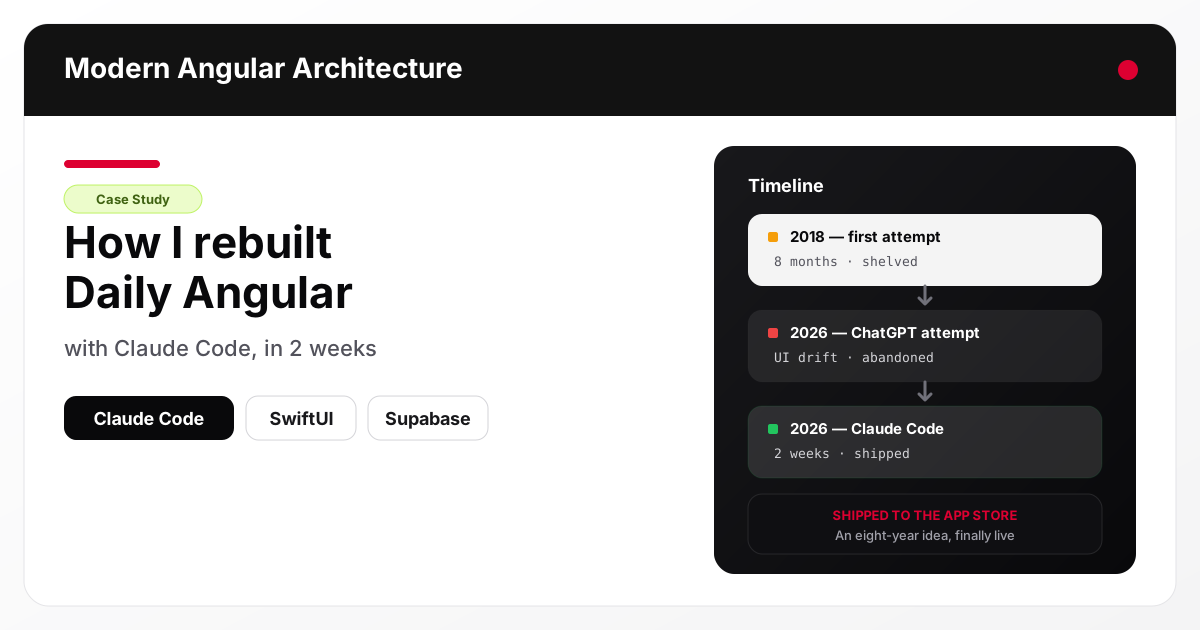
Eight years ago I wanted an app I could use for five minutes a day to practice front-end interview questions on the bus, in a queue, waiting for coffee. The kind of app that respects that your time is stolen in tiny pieces. I looked for it. It did not exist.
I tried to build it myself. That first version took me roughly eight months of evenings and weekends, and I eventually shelved it — not because the idea was wrong, but because I had two small kids and no runway to keep maintaining a side project that was not paying rent. It sat on a hard drive and I moved on.
This year, with AI coding assistants finally good enough to be a real collaborator, I tried again. The first attempt — with ChatGPT — failed on the UI. The second attempt — with Claude Code — shipped in two weeks. The app is called Daily Angular, and this is the story of why it works now and did not work before.
Why I wanted this app in the first place
I was preparing for front-end engineering interviews at a time when the best way to practice was “do a project, read the docs, grind LeetCode.” None of that fit my life. I wanted the Duolingo model applied to a specific framework: bite-sized lessons, spaced repetition, visible streaks, a pass threshold so you actually had to get it right instead of tapping through. Five minutes on the train, one lesson, done.
I looked for something like that and found nothing aimed at front-end frameworks. Plenty of general coding apps, plenty of JavaScript trivia, but nothing that let me drill one framework with structured progression the way a language-learning app does.
So I built the first version myself. It was ambitious for what I could maintain alone, and the technical choices I made back then — a cross-platform framework that was fine but not great on iOS, a backend I was hand-rolling — meant every new feature cost more than it should have. Eight months in, with a toddler and a newborn, I stopped.
Why the first 2026 attempt failed (ChatGPT)
Fast forward to early 2026. AI coding had quietly crossed a threshold. I decided to rebuild Daily Angular properly, and I started with ChatGPT because that is what most people reach for.
The experience was not bad — it was uneven. Prompts produced reasonable code, but iterating on UI was painful. I would describe a screen, get a SwiftUI view, adjust a detail, and the next iteration would drift: renamed properties, subtly different layouts, state wired up a different way than the previous step. Copy-pasting between the chat window and Xcode meant I was the one holding the project model in my head, and I was re-explaining context on every turn.
For something like “write a standalone function” it was fine. For “evolve this screen over ten steps while keeping the rest of the app consistent,” it was not. I shelved the rewrite again, briefly, and tried a different tool.
Why Claude Code worked
Claude Code is different because it lives in the project, not in a chat window. It reads files, writes files, runs builds, and keeps a working model of the whole repository across turns. That last part is the one that mattered for me. I could say “add a settings screen with language toggle and audio toggle, wire it through the existing LanguageManager and AudioManager, and make sure the lesson map reloads when language changes,” and it would do exactly that — no re-pasting context, no drift, no reintroducing bugs I had already fixed.
The second thing that mattered: it respected the architecture I had. I started with a simple Swift + SwiftUI scaffold and let the assistant suggest patterns as the app grew. When I pushed back — “no, I want the audio to only start in HomeView, not at app launch” — it remembered. When I asked it to split a view model, it did not re-invent the naming convention I had already picked. Working with Claude Code felt like pairing with an engineer who had actually read the code.
Two weeks of evenings and one long weekend later, I had an iOS app on TestFlight , then on the App Store . Eight years after first wanting it.
What Daily Angular looks like
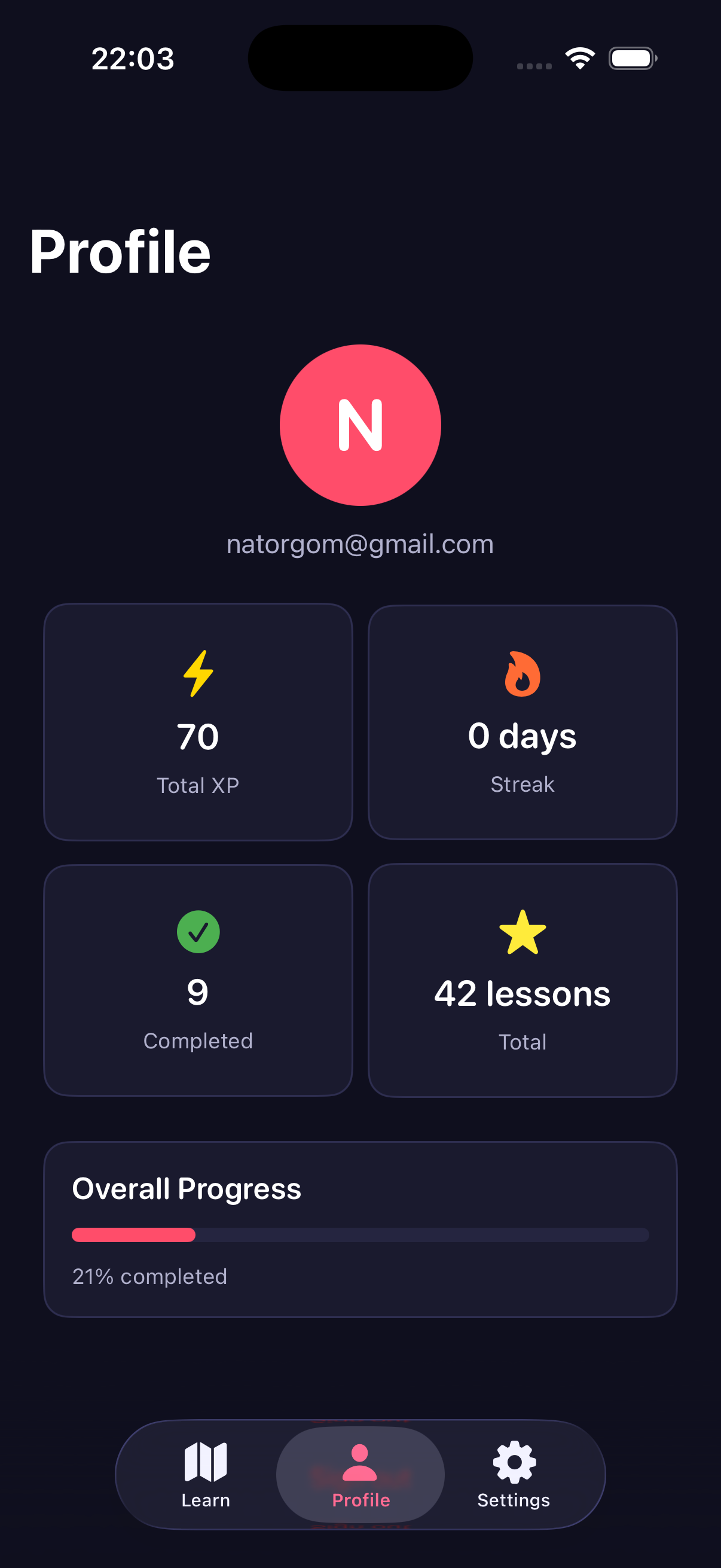
Four screens do almost all the work. The map gives you a sense of where you are in the curriculum, the quiz and drag-and-drop exercises are the actual practice, and the profile screen shows your streak and completion stats so there is something to come back to.
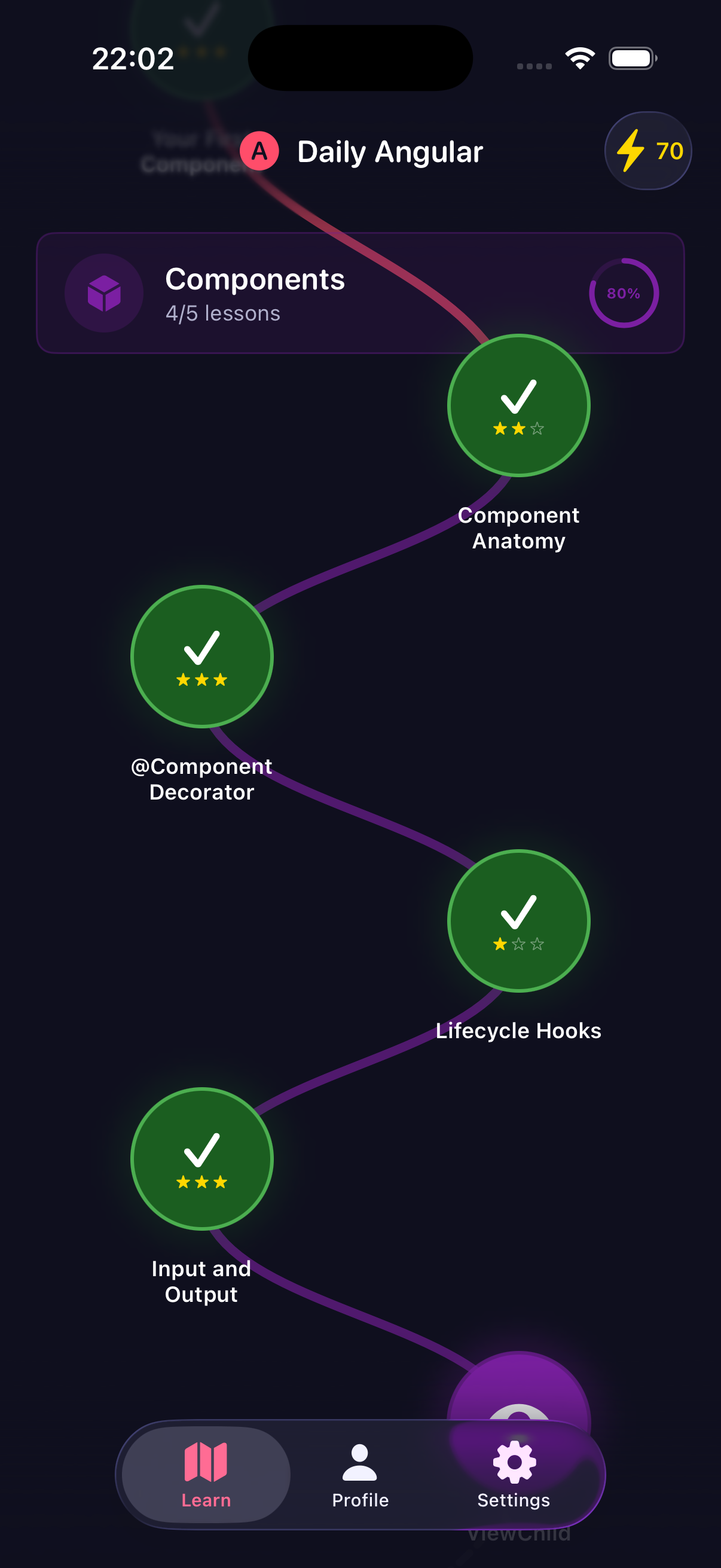
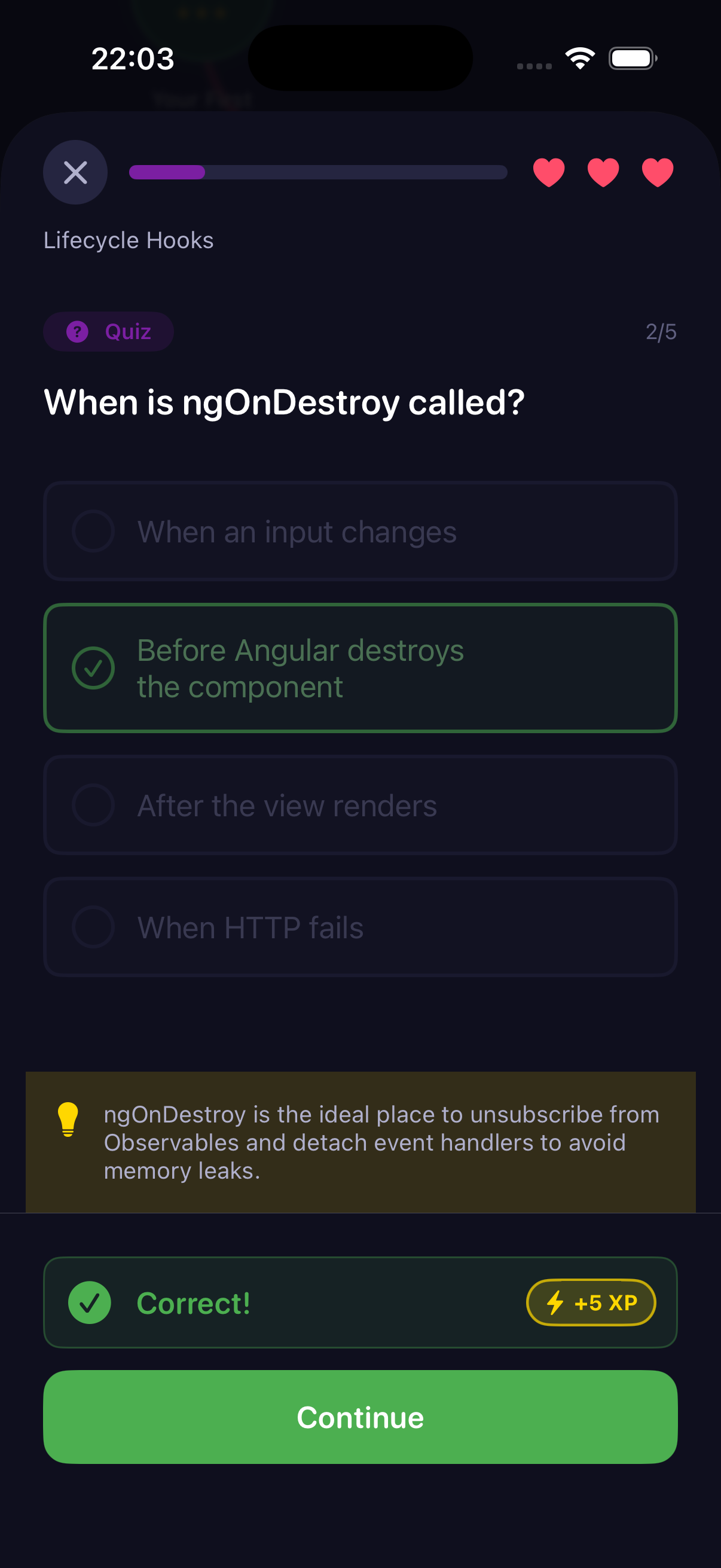
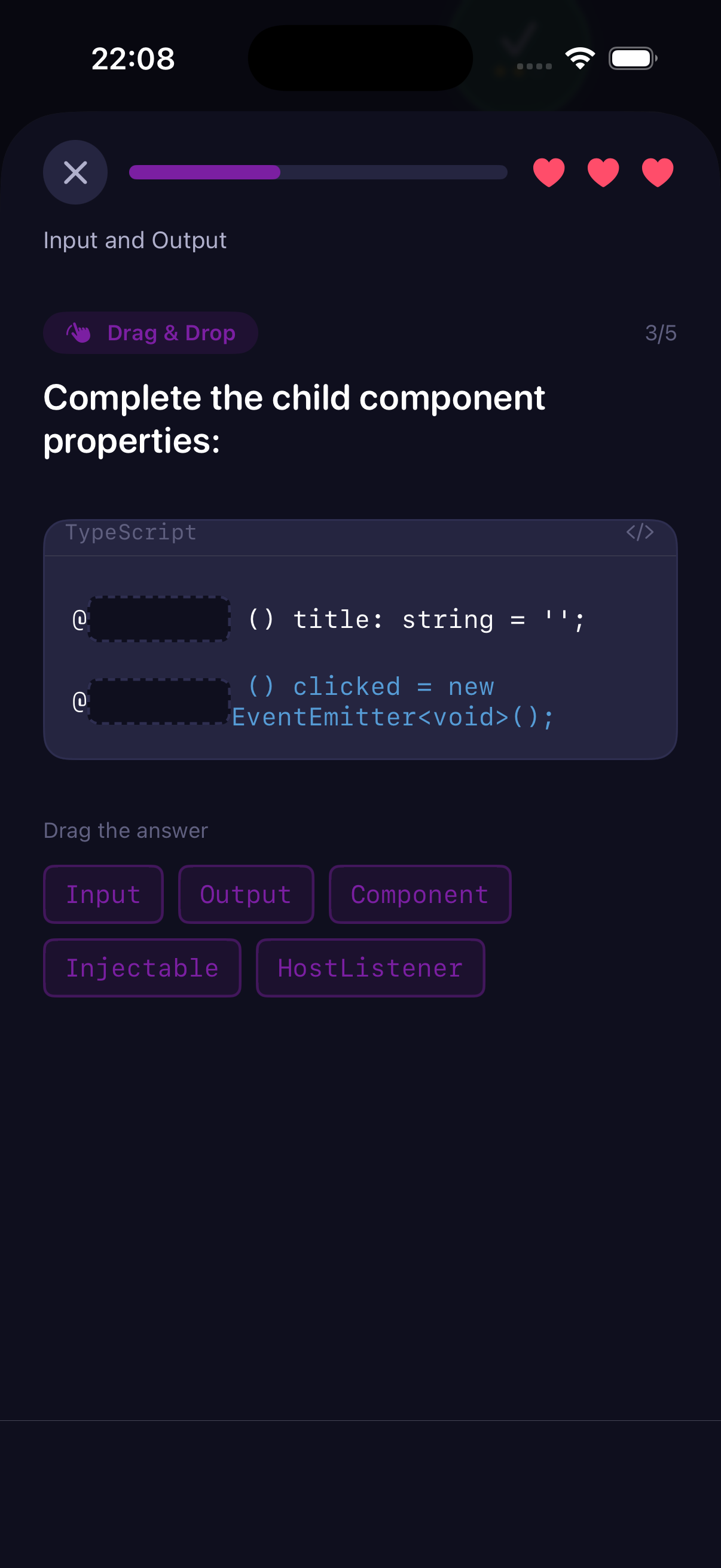
If you want the full product story (feature list, pricing, roadmap), the Daily Angular product page has it. If you just want to install it, there is a direct App Store link .
The stack, and why I picked each piece
I kept the stack deliberately small. Fewer moving parts, fewer things to maintain alone.
- Swift + SwiftUI for the app. I wanted native-feeling iOS, smooth animations, and access to the platform (haptics, audio, notifications) without fighting a cross-platform abstraction. SwiftUI’s declarative model is also a great fit for AI-assisted editing — small, composable view structs are easy to reason about turn by turn.
- Supabase for backend. Postgres plus auth plus row-level security plus a generated REST/realtime layer, all on a free tier that scales. I did not want to run my own server, and I wanted content (lessons, sections, progress) to live in a database I could edit from a SQL file. See Supabase’s own docs for how RLS replaces a lot of custom backend code.
- No heavy state management library. SwiftUI’s
@State,@Observable, and a couple of singletons (AudioManager,LanguageManager) were enough. The lessons I wrote for this very site about when NgRx is worth it apply equally on iOS: add state libraries when complexity demands them, not before. - AVAudioEngine
for background music synthesized at runtime instead of shipping audio files. Smaller bundle, no licensing, and the music only ever plays inside
HomeViewso the auth screen stays quiet. - xcodegen so the Xcode project is generated from a yaml file and diffs cleanly in git. This matters when an AI assistant is creating new Swift files — the project picks them up automatically instead of me dragging them into Xcode by hand.
- Claude Code as the coding collaborator. See the Claude Code docs for how it integrates with the terminal and editor.
Notably absent: no custom backend service, no Redux-equivalent, no cross-platform layer, no analytics SDK at launch. I can always add those. I cannot always remove them.
What AI was and was not good at
A few honest notes on where the collaboration shone and where I still had to drive.
Good at: boilerplate Swift, SwiftUI composition, plumbing state between views, writing Supabase SQL migrations and keeping them consistent with Swift models, generating tests, tracking down build errors from Xcode output, keeping naming conventions stable across a growing codebase.
Okay at: UI polish. The AI could produce a clean screen, but taste decisions — spacing rhythm, how a transition feels, when a haptic is right — were mine. It helped me try ten options fast, then I picked.
Still on me: product decisions. What is a lesson? What is the pass threshold? Why 60% and not 80%? Those answers come from eight years of wanting this specific app, not from any model.
Still on me: App Store submission, review responses, TestFlight testers, marketing copy, pricing. AI can draft and format; it cannot ship for you.
What I would do the same next time
- Start from a running project, even if it barely does anything. Claude Code is far more effective when there is a concrete codebase to anchor against. A blank folder produces more drift than a tiny working app.
- Write a
CLAUDE.mdor equivalent context file early. Describe the architecture, the folders, the conventions, the things you have tried and rejected. It pays for itself within a day. - Keep sessions focused. One feature, one branch, one conversation. Long multi-feature sessions accumulate context rot.
- Commit often. Small, reviewable commits let you roll back a bad suggestion without losing the good ones from the same session.
- Run the build and tests constantly. Do not let unverified code pile up. The assistant is faster at fixing an error you can see than at debugging a screenshot you paste two hours later.
What I would do differently
- Lock down design earlier. My first week had too much “let me try five versions of this screen.” A clearer north-star mockup on day one would have saved days.
- Avoid mixing two AI tools on the same file. I briefly used both ChatGPT and Claude Code on the same codebase. The style drift was obvious and caused a refactor.
- Ship sooner. The version I finally submitted to the App Store was better than the version I was “polishing” three days earlier, but not dramatically better. Shipping to testers is how you learn what is actually broken.
The broader point
AI coding tools are often sold as a multiplier for senior engineers, and that is true, but the bigger story for me is that they compress the ambition floor. Projects I had written off as “too much for one person with a family and a day job” are suddenly possible in a time budget that fits real life. That is a much bigger deal than “writes your unit tests faster.”
Daily Angular is not a large app. But it is an app I wanted for eight years, and it exists now because the economics of building it changed. If you have a shelved project in the same category, this is probably the year to dust it off.
FAQ
What is Daily Angular?
Daily Angular is an iOS app that teaches Angular concepts through short, five-minute interactive lessons with a pass threshold and progress tracking. It is built natively in Swift/SwiftUI with Supabase as the backend.
Why iOS only and not cross-platform?
Native iOS gave me a better feel — animations, haptics, audio, and App Store distribution — without fighting a cross-platform abstraction. Given that I was building solo, one platform done well beat two platforms done adequately. Android is a future option once iOS proves the model.
Why Supabase instead of Firebase or a custom backend?
Postgres with row-level security and an auto-generated API gave me the flexibility of SQL and the speed of a managed service. I can edit content through SQL files checked into git, which is ideal for a content-heavy learning app. Firebase would have worked, but the relational model and SQL access were worth more to me than any one feature.
Did AI actually write “all” the code?
No, and that framing is misleading. I drove architecture, product decisions, UI taste, and the App Store process. Claude Code wrote the majority of the boilerplate, plumbing, SQL migrations, and view composition, and sped up iteration enormously. It is a collaborator, not a replacement.
How much did two weeks of Claude Code cost?
Less than I expected and far less than two weeks of my time would cost in any other accounting. The API and subscription cost for a solo project of this size is within typical indie-dev budget. The far bigger cost is the discipline to use the tool well.
Can I try Daily Angular?
Yes — download Daily Angular on the App Store or read the full product page for feature details. The first version is live and the content catalogue grows over time.
Conclusion
Eight years between the first mockup and a shipped app is longer than I would want to admit. What changed was not the idea and not my skills — it was the tooling. AI coding assistants, specifically ones that live inside the project like Claude Code, removed the “context tax” that kills solo projects. The first version took eight months and died. The rebuild took two weeks and shipped.
If you have been sitting on an idea because “there is no way I have time to build it,” try a concrete scoped prototype this weekend with Claude Code or a similar tool. Not to prove anything about AI — to find out whether your shelved idea has been waiting for the tooling, not the motivation. For a complementary read on how AI reshapes front-end work specifically, see Angular vs Next.js for Content Platforms and Angular Signals State Management .